> For the complete documentation index, see [llms.txt](https://cleyrop.gitbook.io/docs/llms.txt). Markdown versions of documentation pages are available by appending `.md` to page URLs; this page is available as [Markdown](https://cleyrop.gitbook.io/docs/v4.7-en/data-and-ai-project/dataflow/creer-un-dataflow.md).
# Create a Dataflow
Learn how to build a Dataflow step by step.
Creating a Dataflow in Cleyrop means designing a chain of data transformations capable of reading, transforming, producing datasets, or orchestrating processing.
The interface was designed to make this creation **visual, collaborative, and accessible** to all profiles, both technical and business users.
Each Dataflow follows the same general principle, but its behavior depends on the **type chosen when created: Spark or Python**.
***
## Create the Dataflow
When creating, you must [**choose the execution engine type**](/docs/v4.7-en/data-and-ai-project/dataflow/creer-un-dataflow/choisir-le-bon-type-de-dataflow.md) :
* Spark Dataflow → for large-scale distributed and structured processing (ETL, joins, aggregations, standardizations).
* Python Dataflow → for orchestrations, automations, or non-distributed processing (API calls, parsing, collection, business scripts).
To create a Dataflow within a project, click on `Dataflow` in the left menu then on the button `Create`.
* Define a name and a description
* Choose a type: **Spark or Python**
{% hint style="warning" %}
The Dataflow type cannot be changed later.
{% endhint %}
* Choose an **Cluster** execution: depending on the type, a list of clusters will be available.\
Default Clusters with a minimal configuration are created and managed by Cleyrop. New Clusters with different resource configurations can be created by Platform Managers.\
The choice of cluster can be changed later by branch.
### Add input datasets (optional)
{% hint style="info" %}
Only Datasets present in the project's Dataset Library can be used in a Dataflow.
{% endhint %}
You can add an input dataset to your Dataflow:
* it serves as the basis for the transformations,
* when the Dataset is linked to a transformation, it is directly accessible in code:
* In Python transformations via *`cleyrop_datasets["project.dataset"]`*
* In SQL transformations: *`project.dataset`*
{% hint style="warning" %}
The command *cleyrop\_datasets\["project.dataset"]* returns:
* For a Dataflow of type **Spark: a PySpark dataframe**
* For a Dataflow of type **Python: a Lazy Polars**
{% endhint %}
{% hint style="success" %}
You can use**auto-completion** in the code editor: by typing at least three letters of a Dataset name, Cleyrop automatically suggests the correct syntax to insert depending on the context (Spark or Python).
{% endhint %}
Here are some examples of using an input Dataset in code
{% tabs %}
{% tab title="Python" %}
```python
df = cleyrop_datasets["demonstration_customer_care_plus.customer_product_info"]
df = df.drop(columns=["Address", "left_Address", "right_CustomerID", "left_ProductID"])
return df
```
{% endtab %}
{% tab title="Spark SQL" %}
{% code title="Spark SQL: input dataset use " %}
```sql
SELECT
Address,
regexp_extract(Address, '\\d{5}', 0) AS PostalCode,
regexp_extract(Address, '\\d{5}\\s+(.*)', 1) AS City
FROM
project.customers; #Unique Dataset ID
```
{% endcode %}
{% endtab %}
{% tab title="Low Code" %}
{% endtab %}
{% endtabs %}
Alternatively, you can start directly with a transformation that retrieves external data (e.g., via an API, an S3, or an SQL database):
{% code title="API call example polars" %}
```python
import requests, polars as pl
data = requests.get("https://api.exemple.com/data").json()
df = pl.DataFrame(data).lazy()
return df
```
{% endcode %}
### Add a transformation
Transformations represent the processing steps of your Dataflow.
They can be of different types depending on the chosen engine:
Dataflow type
Possible transformations
Output
Spark
PySpark, SQL, Low Code
Mandatory output dataset
Python
Pure Python (Polars or Pandas)
Dataset or other
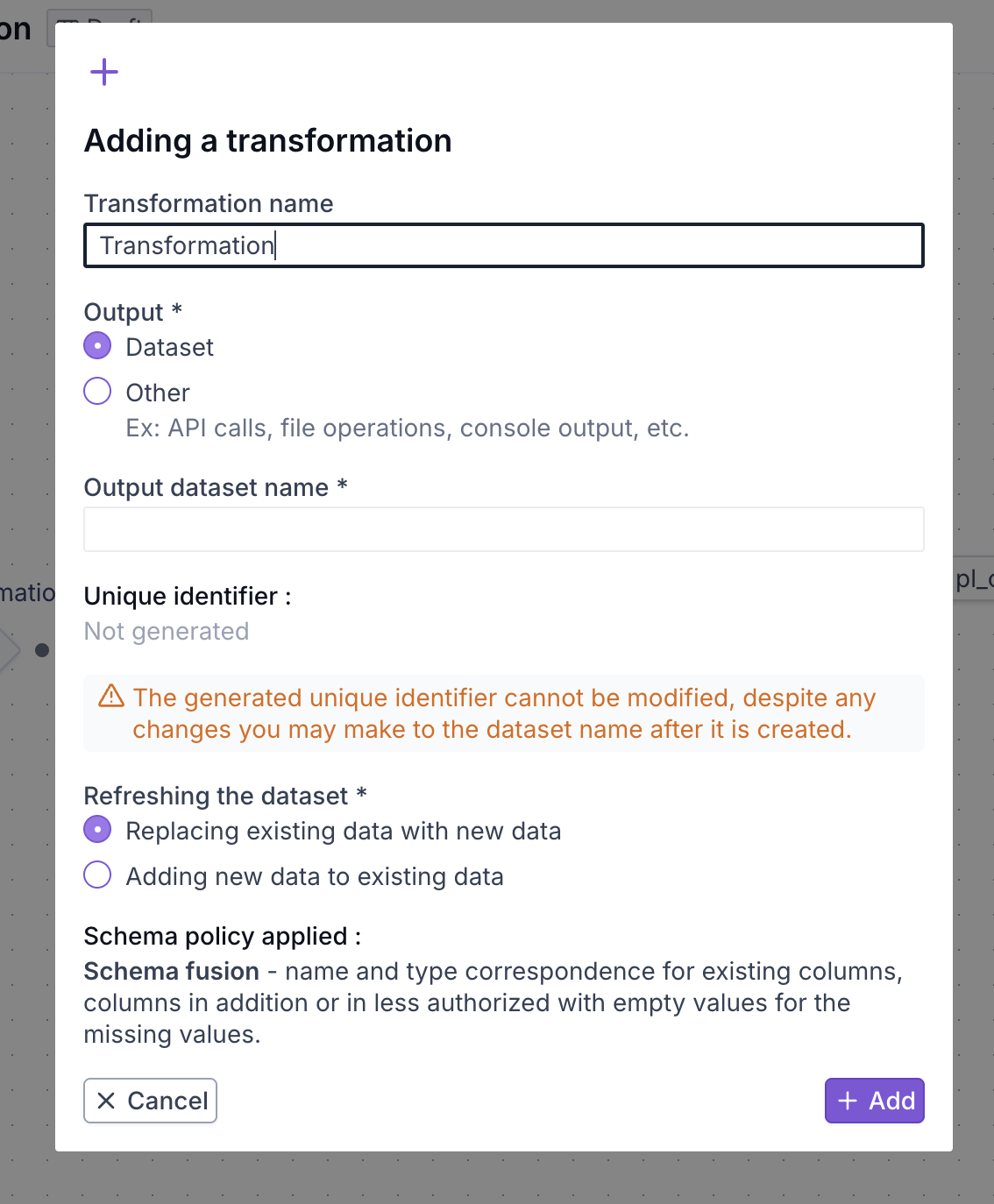
To add a transformation, choose the desired transformation type, then:
* Enter the required information:
* Transformation name for better readability in the graph
* Information about the output Dataset (if Dataset output is chosen):
* Output dataset name (a unique Dataset identifier will then be generated and cannot be modified)
* Refresh mode:
* *Replace* → the old data is replaced
* *Append* → the new data is appended
* Option to choose "Other" as output for a Python transformation in a Python Dataflow
* Optionally link the input Dataset to the transformation by clicking on the right edge of the input Dataset
* Hold the click and connect the input Dataset to the transformation.
* Write [your transformation](/docs/v4.7-en/data-and-ai-project/dataflow/creer-un-dataflow/ecrire-une-transformation.md) or configure your[ Low Code block](/docs/v4.7-en/data-and-ai-project/dataflow/transformer-sans-code-low-code.md).
{% hint style="warning" %}
The **SQL** and **Low Code** transformations are only available for Dataflows of type **Spark**
{% endhint %}
### Configure the output dataset
For transformations, you can configure the [**Output Dataset**](/docs/v4.7-en/data-and-ai-project/dataflow/creer-un-dataflow/configurer-un-dataset-de-sortie.md) :
* **Name**, description, owner
* **Sensitivity**
* **Classification** : bronze, silver, gold
* **Labels**
* **Refresh mode:** *replace or append*
{% hint style="warning" %}
The **refresh mode**cannot be changed after the first execution of the parent transformation
{% endhint %}
This helps control governance and updates to the produced data.
Once your Dataflow has been executed, you can choose to **reference the output dataset in the library** of your project to make it available to other users.
* Use the **Reference** from the graph or the details page of the output dataset.
The dataset marked for referencing will be visible in the library **once the Dataflow has been deployed to production**.
**Beware of the output dataset schema**
The schema of a dataset (columns and types) is **common to all branches of the same Dataflow**.
Some libraries (Pandas, Spark, Polars) do not use the same typing conventions.
### Save and run
When your Dataflow is ready:
* Click Save to record your changes.
* or click Run directly to launch the process; the Dataflow will be automatically saved.
When execution starts, a window opens with a link `Go to` that lets you track the execution status in real time.
You can also find your execution by going:
* to the project's Dataflow page in the history tab
* to the right-hand button panel, Execution tab, and choose the latest execution
The logs of each transformation are visible in real time.
### Saving the position of the nodes of a dataflow
It is possible to modify and save the position of the graphical elements in a Dataflow version already deployed on the main branch. Any other modification remains subject to the usual process via branch and MR.
### Navigate in the graph and view the datasets
* Click on a dataset to preview its content (first 100 lines depending on size).
* Click on a transformation to see the list of linked datasets (input and output) and the logs of the latest execution
💡 This visual approach allows everyone (including newcomers) to quickly understand the processing flow, without having to read the code.
## Dataflow and Dataset status upon creation
When a Dataflow is created, its status is **Draft** :
* The Dataflow can only be modified by its owner (by default, the creator of the Dataflow).
* It can be executed, tested, and iterated freely without impacting other projects
* Its output Datasets are not yet visible or reusable in other Dataflows or in the catalog.
Other project members have read access to the Dataflow and its executions.
{% hint style="warning" %}
To [**collaborate**](/docs/v4.7-en/data-and-ai-project/dataflow/collaborer-et-versionner.md) or reuse a dataset, it must be switched to **Production**
{% endhint %}
To switch to **Production**
1. Open the Dataflow details page.
2. Click on **Deploy**.
***
## Best practices
* For Spark, avoid non-distributed code (standard pandas).
* For Python, ideally return a polars.LazyFrame for compatibility and performance.
* Do not force an output dataset if your transformation does not naturally produce one (e.g., API calls, cleaning).
* Give your transformations and outputs clear and consistent names.
* Test each step in isolation before chaining complex transformations.