> For the complete documentation index, see [llms.txt](https://cleyrop.gitbook.io/docs/llms.txt). Markdown versions of documentation pages are available by appending `.md` to page URLs; this page is available as [Markdown](https://cleyrop.gitbook.io/docs/v4.7-en/personal-space/notifications.md).

# Notifications

Be informed in real time of important events in your projects and your account.

Cleyrop's notification system lets you track the main events related to your projects, datasets and dataflows.

Notifications can be received in the **platform (in-app) and/or by email**, depending on the type of event.

***

## Notification types

<table><thead><tr><th width="218.23046875">Event</th><th width="92.859375">In-app</th><th width="94.125">Email</th><th>Description</th></tr></thead><tbody><tr><td>Added to a project</td><td>✅</td><td>✅</td><td>You receive a notification and a welcome email with a redirect to the project.</td></tr><tr><td>Dataflow failed</td><td>✅</td><td>✅</td><td>The <strong>subscribers</strong> to the Dataflow are informed of an execution failure.</td></tr><tr><td>Dataflow change proposal</td><td>✅</td><td>❌</td><td>The reviewer receives an alert when a merge request is created.</td></tr><tr><td>Dataset refresh failed</td><td>✅</td><td>✅</td><td>The <strong>subscribers</strong> to the Dataset are informed of a refresh failure.</td></tr><tr><td>Quality rule not respected</td><td>✅</td><td>✅</td><td>The <strong>subscribers</strong> to the dataset's Data Quality rules are alerted.</td></tr><tr><td>Deletion of a shared dataset</td><td>✅</td><td>❌</td><td>All users of the affected projects receive an in-app alert.</td></tr><tr><td>Access request to a sensitive dataset</td><td>✅</td><td>❌</td><td>Platform Managers are notified to approve or deny access.</td></tr><tr><td>Access request to a datasource</td><td>✅</td><td>❌</td><td>The project's Platform Managers receive the access request.</td></tr><tr><td>Response to an access request (accepted/refused)</td><td>✅</td><td>❌</td><td>Users receive the decision regarding their request.</td></tr></tbody></table>

## Manage subscriptions

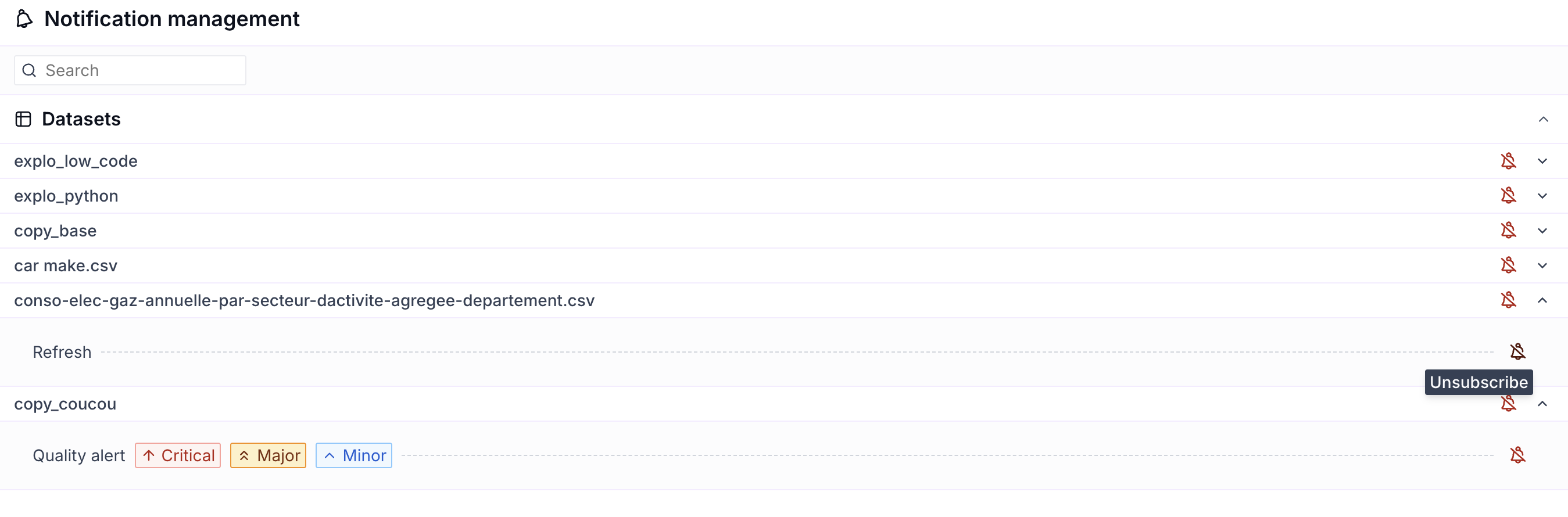
You can manage your subscriptions directly from the interface, in the notifications panel: `Manage notifications`

<figure><img src="https://4159280578-files.gitbook.io/~/files/v0/b/gitbook-x-prod.appspot.com/o/spaces%2FMHNFH6aA4j5ucH4XFBXy%2Fuploads%2Fgit-blob-288de87e542340ead83033070efd4a3db9729775%2Fimage.png?alt=media" alt="" width="375"><figcaption></figcaption></figure>

To enable or disable the following subscriptions:

* Dataflow failure
* Dataset failure
* Data Quality rules

<figure><img src="https://4159280578-files.gitbook.io/~/files/v0/b/gitbook-x-prod.appspot.com/o/spaces%2FMHNFH6aA4j5ucH4XFBXy%2Fuploads%2Fgit-blob-ff3707746c30ca97af170102948e8f8e83df6202%2Fimage.png?alt=media" alt=""><figcaption></figcaption></figure>

***

## Best practices

* Enable essential notifications (Data Quality, Dataflow execution) to avoid data loss.
* In case of recurring errors, check the logs of the associated Dataflows to identify the cause.